



Microsoft Copilot and a New Era of AI-Driven Business Processes
Automatically translated
Evolving from AI assistants into autonomous agents, Microsoft Copilot business processes are opening the door to a new era in digital transformation. In light of Microsoft 365 AI productivity statistics and advanced security protocols, are you ready to explore these new dynamics of the business world?
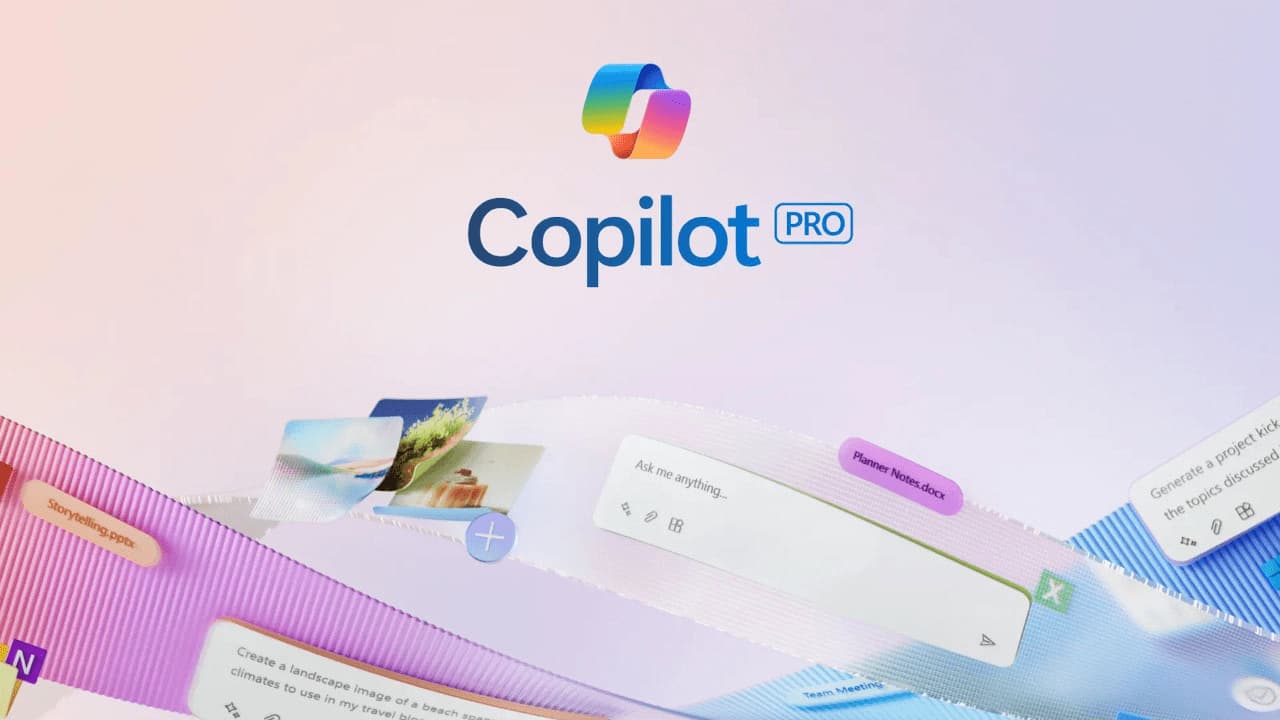
Artificial intelligence, the biggest technology revolution of recent years, is no longer just a fiction we see in movies. It has become the closest coworker at our office desks. Microsoft's Copilot is a "digital assistant" that lets us perform complex computer tasks simply by speaking or writing. However, this assistant offers far more than an ordinary helper. Today, Microsoft Copilot business processes have become the main factor determining how fast companies grow.
How Does Microsoft Copilot Professionally Transform Work Life?
Many people see AI only as a chat box where they ask questions. However, Copilot is built directly into programs you already use, such as Word, Excel, and PowerPoint. In other words, it is integrated and works as part of the program itself.
This structure is defined as "contextual intelligence." Copilot:
Emails
Meeting notes
Documents
Calendar data
It analyzes these together and produces outputs tailored to the user.
Operational Use Examples
Outlook: Email summarization, automatic reply drafting
Excel: Data analysis, chart generation, formula suggestions
PowerPoint: Creating presentations from text
Word: Writing, editing, and restructuring text
Image Generation: DALL·E Integration
Microsoft Copilot also brings image generation from text into business processes using DALL·E technology . Thanks to this integration:
Original visuals for presentations are created within seconds
Marketing content can be produced quickly
Prototype ideas can be visualized
This provides a significant time and cost advantage, especially for design and content teams.
What makes Microsoft Copilot stand out is not only producing content, but also being able to act by understanding business processes in context. According to Microsoft's official statements, Copilot analyzes email, document, meeting, and calendar data within Microsoft 365 to offer contextual suggestions to users and automate tasks. Unlike classic software use, this structure turns the "user who gives commands" model into a "system that carries out work together" model.
According to Microsoft's Work Trend Index report, 70% of employees who use Copilot say they are more productive, and 68% report an increase in work quality. In addition, 57% of users say they can start their work more quickly. These figures show that the impact of Microsoft Copilot business processes is not merely theoretical but directly measurable.
One of Copilot's strongest aspects in professional transformation is meeting management. Thanks to the Microsoft Teams integration, Copilot analyzes meetings in real time, summarizes key points, and extracts action items automatically. This eliminates the time spent on post-meeting reporting.
On the Excel side, the capabilities Copilot offers significantly transform data analysis processes. Users can query data in natural language, derive trend analyses, and create automatic visualizations. According to Microsoft, these features reduce the need for technical knowledge and make data analysis accessible to broader audiences.
Autonomous AI Agents (Agentic AI) and Workflow Automation
One of the most critical topics in Microsoft's post-2025 strategy is "Agentic AI," meaning autonomous AI agents. These systems are not structures that only carry out given commands; they plan, execute, and complete tasks.
Copilot Studio and agent structures introduced at the Microsoft Build event allow users to develop systems that automate their own workflows. These agents can carry out steps such as collecting data, analyzing it, and producing results on their own.
Thanks to autonomous workflow management, Copilot can handle a customer request from start to finish. It analyzes the request, routes it to the relevant department, tracks the process, and generates a result report. Unlike classic automation systems, this offers a much more flexible and adaptive structure.
Enterprise AI agents also optimize data flow within the organization. According to Microsoft's statements, these systems operate by preserving data context across different applications and minimize information loss.
Autonomous workflow management stands out for the following features:
Contextual decision-making
Analysis of multiple data sources
Ability to manage processes end to end
Agents built with the Microsoft Copilot Studio platform:
Collect data
Analyze it
Make decisions
Complete the process
This model moves the user from the position of "doing the work" to the position of "managing the process." Unlike traditional automation, the system acts based on dynamic data rather than static rules.
Enterprise Data Security and Microsoft's Security Protocols
The most critical topic in enterprise AI use is AI security protocols. Microsoft treats this issue as a core component of Copilot's system architecture.

According to Microsoft's official documentation, Copilot does not use user data to train models, and all data stays within the organization's boundaries. This approach is a significant advantage, especially for organizations that handle sensitive data.
Copilot also uses the existing security infrastructure of Microsoft 365. This infrastructure includes role-based access control, data loss prevention (DLP), and compliance standards. As a result, users can access only the data they are authorized to see.
Microsoft also states that Copilot works with a "grounded AI" approach. This model ensures that responses are based only on accessible and authorized data. In this way, both accuracy and security are protected at the same time.
Core Security Layers
Data Privacy: Enterprise data is not used to train AI models
Tenant Isolation: Data stays within the company's own Microsoft 365 environment
Role-Based Access: Data access is limited according to user permissions
Compliance Standards: Compliance with regulations such as GDPR and ISO 27001 is maintained
Grounded AI: Generated outputs rely only on accessible enterprise data
This structure makes Copilot far more secure compared to open AI systems.
Copilot Pro Turkey 2026 Pricing and License Structure
Microsoft Copilot is offered with different license models for individual and enterprise use. In particular, a per-user licensing model applies to Microsoft 365 integration.
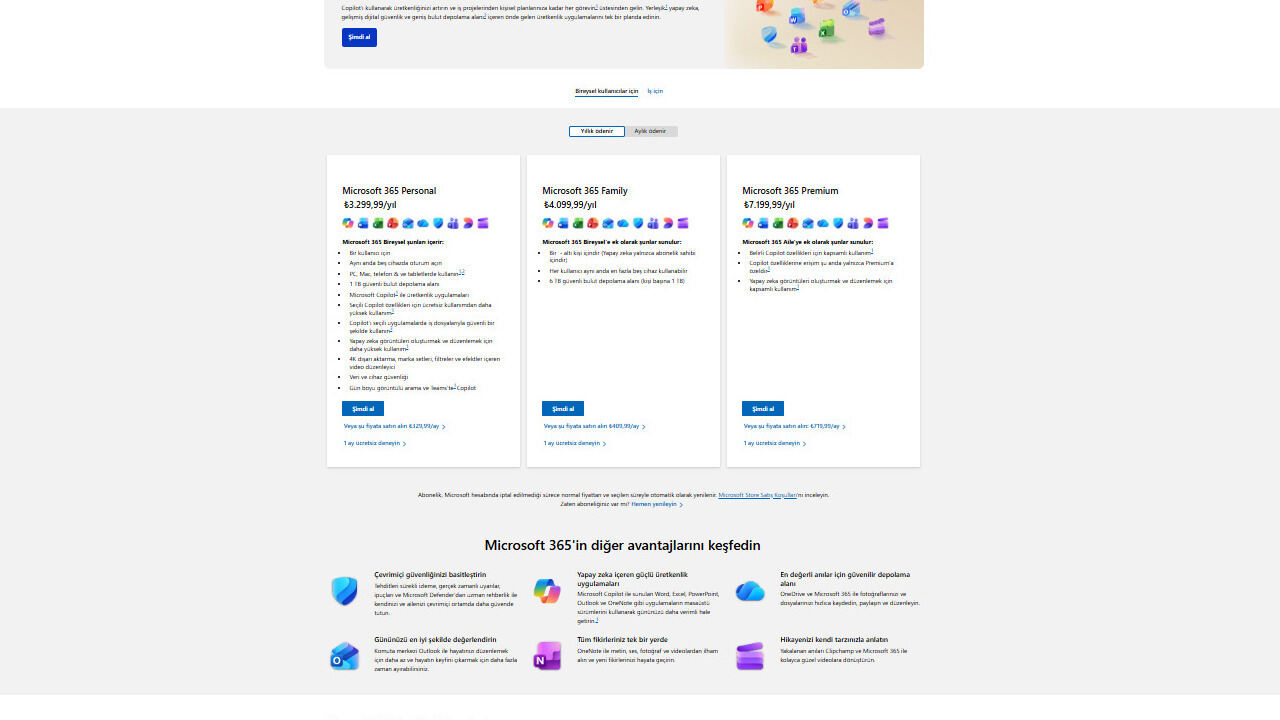
The Microsoft Copilot offering is presented through three core plans that serve every segment, from individual users to large enterprise structures. Across all plans, the annual payment option provides a 15% saving compared to monthly payment, creating a cost advantage for businesses and individuals.
1. Individual Plans
Designed for those who want to increase personal productivity, this category provides AI support integrated into Microsoft 365 applications.
Featured Package: Microsoft 365 Personal – ₺3,299.99 per year (15% discount compared to monthly payment).
2. Business Plans
These are productivity-focused packages optimized for small and medium-sized businesses to automate their workflows.
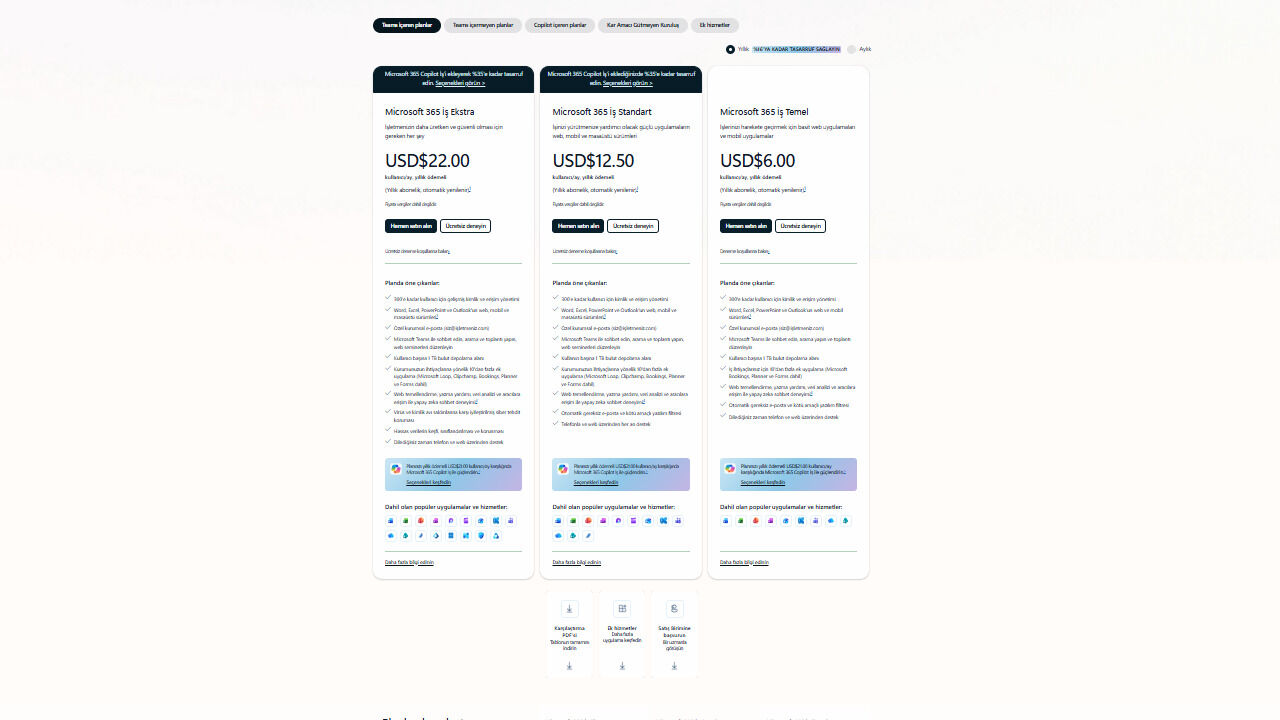
Featured Package: Microsoft 365 Business Standard – 12.50 USD per user per month.
3. Enterprise Plans (For Large Organizations)
These plans are designed for large-scale structures that require the highest level of security, unlimited data analytics, and the activation of autonomous agent (Agentic AI) capabilities.
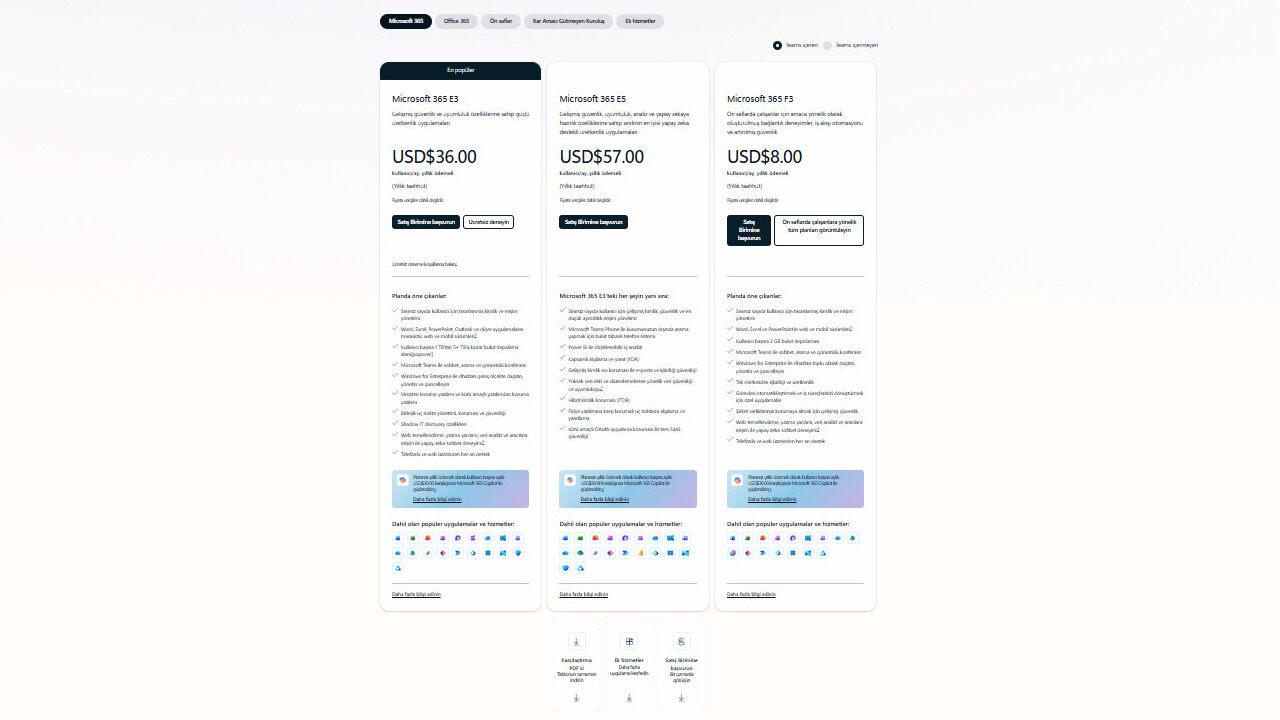
Featured Package: Microsoft 365 E3 – 36.00 USD per user per month.
Evaluated in terms of Microsoft Copilot business processes, the productivity gains provided and especially the discount advantage on annual plans make the return on investment (ROI) much more attractive. You can follow the latest offers that best fit your business size on the Microsoft 365 Plans page.
Strategic Differences Between ChatGPT Search and Microsoft Copilot
The difference between Microsoft Copilot and ChatGPT Search essentially emerges in the data usage model and the level of integration;
Copilot works by accessing enterprise data within Microsoft 365. In other words, emails, documents, meetings, and internal company data are Copilot's main data sources. This positions it directly within business processes.
ChatGPT Search works by accessing open web data. This system scans current information on the internet and presents it to the user, and it performs particularly strongly in research processes.
According to Microsoft's own statements, Copilot's main purpose is to "redesign workflows." This moves it from a classic AI tool to an operational platform. As a result, the two systems serve different needs. Copilot sits at the center of business processes, while ChatGPT Search is positioned more toward information access and content generation.
The New Threshold of Digital Transformation
As the role of AI in the business world deepens every day, Microsoft Copilot business processes are no longer just a productivity tool but a system positioned at the center of operations. Thanks to autonomous agents, advanced security protocols, and Microsoft 365 integration, Copilot is redefining how companies work.

For organizations that want to gain a competitive advantage in the coming period, the decisive factor will not be using AI, but how well they can integrate it into business processes. At this point, Microsoft Copilot stands out as one of the building blocks not only of today's but also of tomorrow's way of working.
Yörünge Aynaları: Geceyi Güneşe Çeviren Tehlikeli Proje


Tesla 2026 Yenilikleri: Otonom Sürüş ve Enerji Devrimi


